About
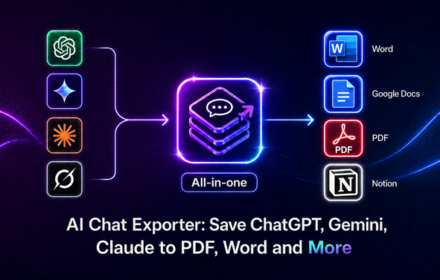
AI Chat Exporter is an all-in-one browser extension for exporting conversations from ChatGPT, Gemini, Claude, and Grok to PDF, Word, Google Docs, Notion, or Markdown.
Save selected messages or an entire AI conversation in just a few clicks. Before exporting, you can customize the font family, font size, and text color, then continue editing, sharing, printing, archiving, or organizing the content in your preferred workspace.
AI Chat Exporter helps you preserve useful AI answers, code sessions, research, writing drafts, project discussions, tables, equations, and structured outputs without manually copying and pasting each message.
KEY FEATURES ⚙️
Export chats from multiple AI platforms
Use one consistent export workflow across the AI tools you already use:
ChatGPT: export conversations, answers, code, tables, and research sessions
Gemini: save chats for editing, sharing, printing, or documentation
Claude: export conversations and structured content
Grok: save chats and continue working with the content outside the original platform
You do not need a separate exporter for each AI assistant.
Multiple export formats
Choose the format that fits your workflow:
PDF: save AI chats for printing, archiving, offline reading, or sharing
Word (.docx): create editable documents for formatting and reuse
Google Docs: continue editing and collaborating online
Notion: organize conversations in your knowledge base or project workspace
Markdown: save clean text for documentation, publishing, note-taking, and developer workflows
Whether you need a printable file, an editable document, or a collaborative workspace, AI Chat Exporter helps you move conversations to the right destination.
Export selected messages or full conversations
Choose exactly what you want to save:
Select individual messages or sections
Export only the answers relevant to your work
Save a complete conversation with its full context
Extract a specific code block, table, explanation, or structured response
Archive long research, writing, or technical sessions
Selected-message export is useful when you only need part of a chat. Full-conversation export is ideal for preserving complete sessions.
Customize typography before export
Control the appearance of your exported document:
Choose a font family
Adjust the font size
Select a text color
Apply a consistent style across supported export formats
These settings give you more control than basic copy-and-paste tools.
Preserve rich conversation content
AI Chat Exporter is designed to maintain the structure of your conversations, including:
Text and formatted sections
Headings
Numbered and bulleted lists
Code blocks
Tables and structured outputs
Editable mathematical formulas and equations
Links and references
Images and visual content
Long-form answers
Content support may vary by AI platform, conversation type, and export format.
Fast and simple workflow
Works directly on supported AI chat pages
Export in just a few clicks
No separate AI Chat Exporter account required
No AI platform API key required for standard exports
Download files or send content to your chosen destination
Google Docs and Notion exports may require you to sign in to the corresponding service.
SUPPORTED AI PLATFORMS 🤖
ChatGPT Exporter
Export ChatGPT conversations to PDF, Word, Google Docs, Notion, or Markdown.
Use AI Chat Exporter to:
Save ChatGPT chats as PDF
Export ChatGPT conversations to Word
Send ChatGPT answers to Google Docs
Export ChatGPT chats to Notion
Convert ChatGPT conversations to Markdown
Save code sessions and research discussions
Export selected messages or complete conversations
Gemini Exporter
Export Gemini chats into portable, editable, and shareable formats.
Use AI Chat Exporter to:
Save Gemini chats as PDF
Export Gemini conversations to Word
Send Gemini content to Google Docs
Export Gemini chats to Notion
Save Gemini conversations as Markdown
Preserve research and writing sessions
Export selected answers or complete conversations
Claude Exporter
Save Claude conversations and structured outputs.
Use AI Chat Exporter to:
Export Claude chats to PDF
Convert Claude conversations to Word
Send Claude chats to Google Docs
Export Claude conversations to Notion
Save Claude chats as Markdown
Preserve long research, writing, and coding sessions
Export selected messages or complete conversations
Grok Exporter
Move Grok conversations into the document format that works for you.
Use AI Chat Exporter to:
Save Grok chats as PDF
Export Grok conversations to Word
Send Grok responses to Google Docs
Export Grok chats to Notion
Convert Grok conversations to Markdown
Save technical and research discussions
Export selected messages or complete conversations
USE CASES 🎯
Developers and engineers
Save coding conversations, debugging sessions, technical explanations, code blocks, architecture notes, and documentation.
Writers and editors
Move outlines, drafts, editing suggestions, content briefs, and writing ideas into Word or Google Docs.
Researchers and analysts
Archive research conversations, comparisons, summaries, market analysis, and structured findings in PDF, Google Docs, or Notion.
Students and academics
Save explanations, study notes, practice questions, summaries, essay outlines, and revision materials for later review.
Professionals and teams
Turn AI conversations into reusable project plans, meeting notes, process documents, sales ideas, and internal knowledge.
Content creators
Export video outlines, scripts, newsletters, content calendars, SEO briefs, podcast plans, and campaign ideas.
Consultants and freelancers
Convert client-related AI discussions into proposals, reports, recommendations, scopes, and action plans.
Knowledge management
Build an organized library of prompts, answers, instructions, research findings, code examples, and reusable content outside the original AI platform.
HOW TO EXPORT AI CHATS 🔍
Install AI Chat Exporter from the Chrome Web Store.
Open ChatGPT, Gemini, Claude, or Grok.
Start a new conversation or open an existing chat.
Optionally customize the font family, font size, and text color.
Export selected messages or the full conversation to PDF, Word, Google Docs, Notion, or Markdown.
IMPORTANT LINKS 📌
Official website: https://backrun.co/ai-chat-exporter
Support and feedback: hi@backrun.co
Privacy Policy: available on the official website
Bug reports and feature requests: contact the support team by email